After graduating college, I wrote and produced my short film “Bartleby.” I scored a managing job at my local movie theatre. I wrote and rewrote a spec script, moved in with my girlfriend, and picked up production assistant gigs where I could.
Listing it out like that makes me sound busy, but I felt horribly unproductive once I finished my short film. The movie theatre job was part time, the gigs were few and far between, and the script edits seemed never ending. Compared to college (where I’d complete four plus classes a semester and squeeze in passion projects despite my sleep deprived state) I felt aimless and lazy.
I hadn’t fully realized it before, but I thrive on the pressure of due dates, the presence of schedule, and the pride of being relied on. Screenplay competition deadlines helped me to zero in on my spec script as I struggled to form a routine— weekends mean nothing when you work most of them, but my girlfriend’s consistent schedule helped by proxy.
Then I came across a strategy that changed my life: time blocking.
Before I started time blocking, I’d write a long list of things I should get done. I’d jump from task to task, overwhelmed because I should’ve done half of these things yesterday. Overwhelm led to procrastination, which led to another long list the next day and a lot of frustration.
How does time blocking work?
Time blocking gives structure to your to-do list. You group similar tasks together, then schedule these blocks into your calendar. This grants you a level of flexibility as well as structure. Getting a handful of similar, smaller tasks done in one sitting takes them off your mind for the rest of the day.
Here’s how to start time blocking.
Brainstorm your to-do list.

This to-do list is a brain dump, not a road map. List anything that comes to mind. Tasks you’ve been putting off, ones that tend to fall through the cracks, even fun things that you’ve been meaning to get to but haven’t made time for.
Next, picture your ideal self going about her day. How does she get ready in the morning? What chores does she complete on a daily or weekly basis? Are there any habits she would like to start?
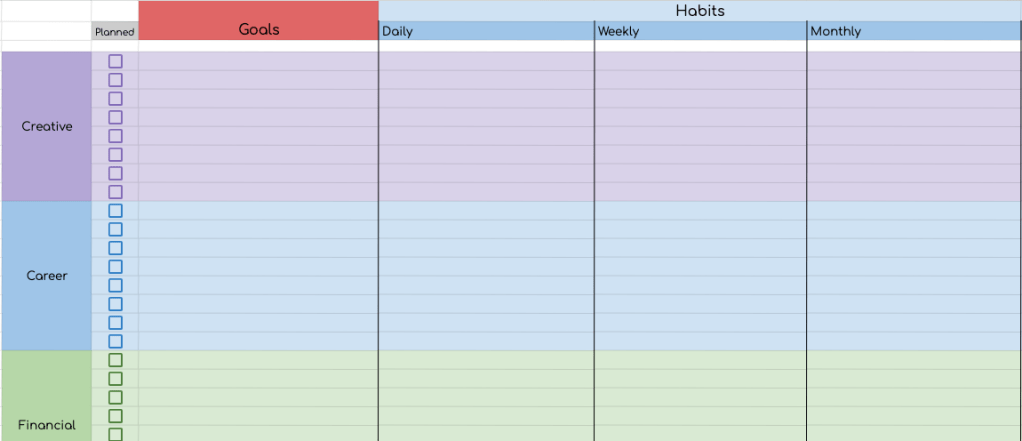
List out your long term goals and brainstorm what daily, weekly, or monthly habits will get you closer to that goal. It might help to separate your goals into these categories: financial, personal development, career, relationships, creative, and spiritual. (You can download the spreadsheet I use below.)
If, like me, you’re currently writing a novel, then spending two hours a day working on it may benefit you. If your goal is to stick to a budget, sitting down once a month to plan your spending can help control impulse buys. Something as simple as cooking dinner around the same time every day or planning to grocery shop every Sunday adds intention and structure to your life.
Now that we know what needs to get done, it’s time to:
Prioritize with separate Google calendars.
Danielle Colada’s YouTube video on time blocking made the strategy click for me. I used to schedule out my tasks on a dry erase board or in my notes app, but I’d often miss my time frame. As a result, my whole schedule would get pushed back and I’d end up discouraged. Yes, I would reorganize the schedule, but I’d still feel discouraged. The tasks I was meant to prioritize would get lost among other, less important tasks. They weren’t visually distinct enough.
To alleviate this, we’re gonna create separate Google calendars for each priority level. And I mean separate. It takes a little more effort (since you have to use a desktop to create the separate calendars) but it’s worth it, I promise. Once they’re set up, you’ll be able to check and uncheck the calendars you want to see, immediately decluttering your calendar right in the app.
To create the separate calendars, open Google calendar in your web browser. Click the + next to “other calendars” and select “create new calendar.” Once you give it a name, you’re all set! Click the vertical dots icon next to your new calendar to change the default color.
Danielle separates the tasks into five categories, but I only use four. (I find her second category, bottlenecks, unhelpful.) Each category gets a default color to distinguish it from the others. Once you complete that task, you turn that task gray to mark it complete.
If you don’t get to a task, it isn’t a big deal. You just delete it from the calendar or reschedule it for a different day. No shame.
Now for the categories.

A. Event/Appointment
If people outside of yourself will be affected by your lateness, it belongs in this category. It’s for your work schedule, meet ups, doctors appointments, etc.
I like to split this category into two colors. For me, things in brown are boring— work, the doctors, my other work. Things in red are fun— concerts, comic-cons, parties, you name it. It helps me to better balance work and fun.
If you already label events by color and you want to keep it that way, that’s totally fine. Just make sure your other calendars are separate colors from the ones you already use.
B. Critical
These tasks don’t immediately impact people outside of yourself, but it’s very important to get them done at the scheduled time. You risk falling behind if you don’t.
This could be a bill you have to pay or a personal due date. My daily writing goal falls in the critical category. If I want to get this novel written in a timely fashion, I need to complete this goal. But it isn’t the end of the world if I don’t.
The time I set aside to schedule the following week also lives in this category.
C. Daily

These are things you want to do daily (or almost daily) to build a routine. Meditation, your morning or nightly routine, and exercise might fall into this category.
And remember, since we’re time blocking you don’t necessarily have to list every single thing in your calendar.
My morning routine usually consists of waking up, making my bed, getting dressed, eating breakfast, and brushing my teeth. On my calendar, all you see is “floss, brush.” That’s because making my bed and getting dressed are already habits for me. The things I forget to do in the morning are to eat and brush my teeth.
Since I only ever brush my teeth after I eat, it’s the only thing written down. The other activities in the block are implied. I don’t gray out the block until I both eat and brush my teeth.
Don’t worry too much if you have 45 minutes scheduled, but it takes you an hour. Don’t worry if you wake up late and did everything two hour late. The purpose of the calendar is to give you an idea of your goals and accomplishments for the day. It doesn’t have to be exact.
If it helps you to reschedule your day when you’re running late, by all means do it! But you don’t have to get hung up on exact times. And you can always delete things if you need to! Missing one day of exercise won’t hurt, especially if it’s more important to get your laundry done that day.
D. Flexible
This is the final category and the least important, all things considering. These are tasks that can be moved around without much consequence. If you have to cut something from your day, it’s best to cut one of these items.
For me, exercise is in this category even though I want to do it every day. I’d rather cut it out than my meditation, but your priorities are going to be different from mine.
Now that we have our priorities straight, it’s time to:
Schedule your time blocks.
Take a look at your to-do list and group like activities together. Now decide if these activities fall in the events/appointments, critical, daily, or flexible categories.
To add blocks to the calendar, tap the plus sign in the bottom right of your app and chose event. Just underneath the time and date of the event, you can select which calendar you’re adding this event to. Make sure it’s the one you want.
If you want this block to repeat, click “more options” underneath the date to customize how you want it to repeat. Repeating events makes scheduling your week/day sooo much easier.
You can always edit the time/day of the block. When doing so, click “this event” to ONLY alter the current event and “this and all following events” to change the scheduled event from here on out.
While scheduling, ask yourself the following questions:
- How often do I want to complete specific tasks?
- What day or time of day will I be the most productive in completing this task?
- What time periods should I leave blank for personal time?
For instance, chores. Does it make more sense for you to dedicate an hour each day to doing them? Would you rather work on them for five hours straight on your day off? Or do you want to strictly vacuum every Monday, do laundry every Tuesday, etc?
I decided chores were a flexible task that would be easier to complete if I worked on them for an hour every day. When I set up my repeating time block, I wrote down “dishes, laundry, litter” as suggested chores to accomplish in that hour.
But they’re just suggestions. I’ll specify chores a day or week before depending on how low I am on laundry, how stinky the litter boxes are, and whether or not it’s my turn to do the dishes. If I didn’t get to something the day before, I’ll push it to the next day. If I woke up late and would rather exercise instead of completing chores, I’ll push it back again. Sometimes, time gets away from me and I end up working on chores for three hours straight. That’s okay! They’re flexible for a reason! And so are you!
If you find yourself constantly skipping a task, try doing it at a different time. On the days I work eight to twelve hours, I tend to never get around to working on my novel. So I try to write for an hour before going to work. Does it always happen? No. But some progress is better than no progress.
Make sure you leave space in your day for personal time. You can either block it off or do as I do and leave gaps in your calendar. Usually, my girlfriend and I start cooking dinner at 5PM and I keep the rest of my night free to hang out with her on the nights I’m not working late. Often times I end up completing chores or working on my writing project, but I like keeping that time frame empty and flexible.
Tips and Tricks:
- Overestimate how long things are going to take.
- Be flexible. Interruptions and distractions happen. The best thing you can do is forgive yourself, alter your plan, and move on with your day. You can do it!
- Sit down once a week (or at the end of each day) to make micro changes to your automated schedule. If you’ve been working later, allow yourself to start the day later. If there’s an important event that take up most of the day, delete some of your flexible blocks to make room for it.
Time blocking helps you decide what tasks you want to prioritize and when you’d like to achieve them. Planning ahead keeps you from feeling overwhelmed by your busy schedule.
Compared to a bullet journal or written schedule, the Google calendar is easy to alter in a timely fashion. And because events automatically repeat on the calendar, your day is already organized.
What time management strategies do you use? Let me know in the comments what works for you!
 Michelle's Mindworks
Leave a comment